WINDOWS 10 & 11 · 1-CLICK SETUP.EXE LOCAL DESKTOP APP · QR PHONE & IPAD CAM/MIC

Focus shouldn’t feel like a scolding spreadsheet.

Apex ADHD Assistant is a calm, standalone Windows desktop companion built for adults and kids who stall at overwhelming task lists. Install in one click, pair a real-time 3D desk bot or plush friend with a warm human-sounding voice, connect any Phone or iPad by QR code if your PC has no webcam or microphone, and keep 100% of your tasks privately on your own computer.

15 Live 3D Companions
6 Adult Bots + 9 Kids Pets
Natural Voice & Sound
10 Neural Voices · $0 AI Bills
Phone & iPad QR Bridge
Wireless Cam, Mic & Speaker
BROWSER PREVIEW // ACTUAL PROGRAM 3D BOTS
LIVE 3D · DRAG BOT TO ROTATE
Atlas Bot 3D focus companion from Apex ADHD Assistant
Atlas Bot Hovering Focus Droid · Studio Voice: Ryan
25:00 Pomodoro block · ready on this PC
“Let’s open the doc and write one ugly first line. Momentum beats perfection.”

    ↑ Try clicking Atlas Bot, Flux Gyro, Byte Bot, Aegis, Kitsune, Zippy, or Sunny above—these are the exact 3D models from the Windows program! (This page is an interactive browser preview; the full Apex ADHD Assistant runs locally as a standalone Windows 10 & 11 desktop application.)

    NO UNZIPPING · ZERO TECH SETUP

    1-Click Setup.exe on Windows 10 or 11

    Never unzip folders or touch a command line. Run Apex-ADHD-Assistant-Setup.exe once for automatic Desktop & Start Menu shortcuts and clean Windows Settings uninstall.

    NO WEBCAM OR MIC ON YOUR PC?

    Connect any Phone or iPad by QR code

    Scan an end-to-end encrypted HTTPS QR code to turn any iPhone, Android, or iPad into your wireless camera, push-to-talk mic, speaker, and desk timer—even on wired Ethernet PCs.

    ADULTS & KIDS IN ONE APP

    Executive 3D droids + PIN-safe Child Mode

    Sleek desk bots for adult deep work, plus a separate Child Mode with 3D plush pets, 15-minute homework timers, and parent PIN controls.

    LOCAL PRIVACY · $0 EXTRA AI BILLS

    Active Subscription · Included Offline Coach

    Your Apex subscription includes the built-in coach & 10 Studio Neural voices running locally on your PC with $0 extra AI API bills—plus optional Ollama or cloud AI with hard daily caps.

    Real Windows Application Screenshots · Explained Step by Step

    See inside the actual program—and understand how every screen works

    Every image below is an unretouched screenshot captured directly from the live Windows 10 & 11 program. Scroll through all 8 screens (or click any screenshot to view it full-size) to see exactly what you get before you download.

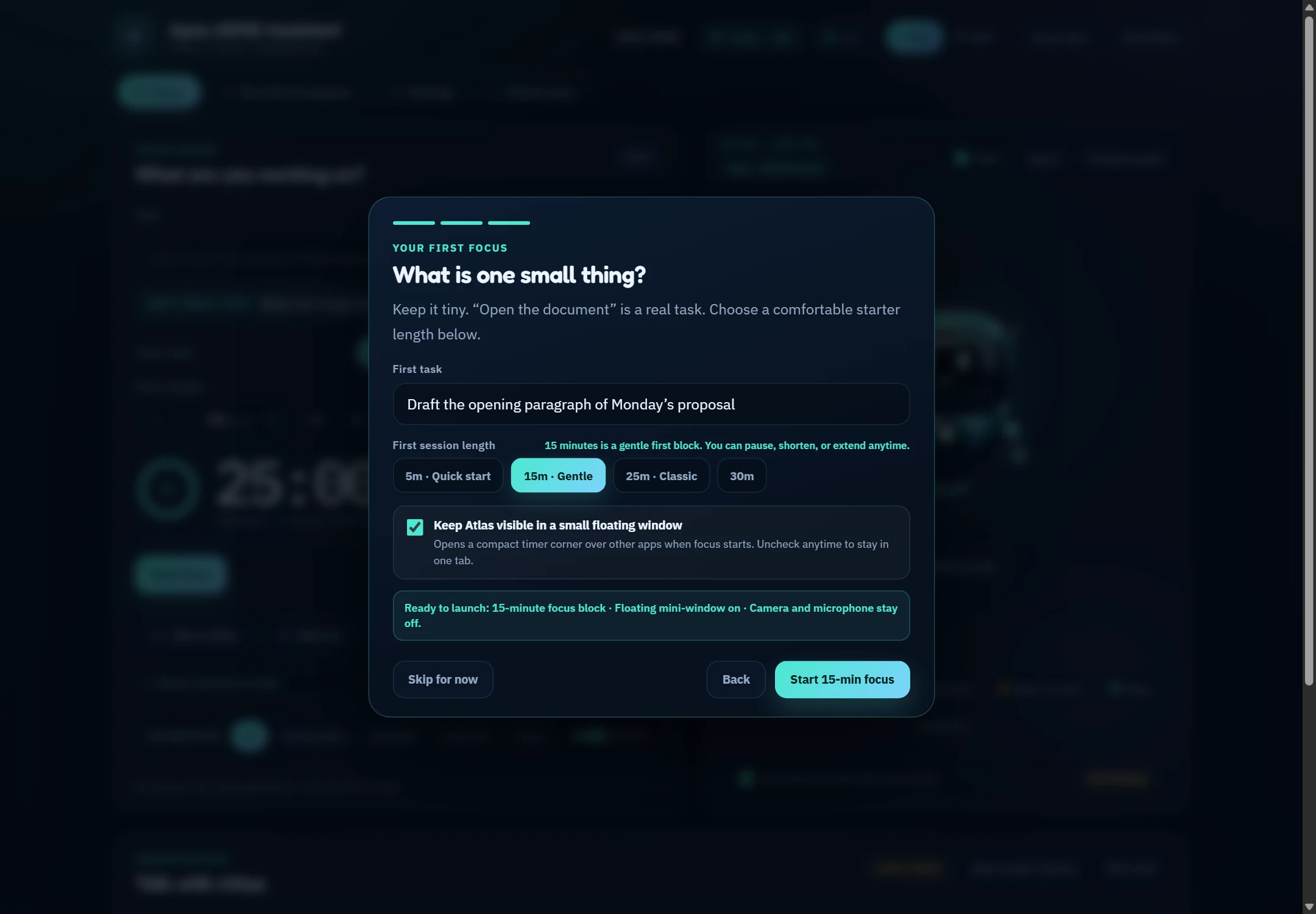
    01 · First-Run Welcome & 30-Second Starter Setup
    Apex ADHD Assistant Welcome screen showing first task entry, 5m/15m/25m/30m gentle duration chips, floating companion toggle, and clear privacy summary.
    SCREEN 01 OF 08 · ZERO-FRICTION ONBOARDING

    Start your first calm focus session in 30 seconds—no sign-up or setup maze

    Right after installing with Apex-ADHD-Assistant-Setup.exe and entering your subscription key, a friendly 3-step welcome asks whether an adult or child is focusing, introduces your companion, and helps you pick one tiny task—so you never face an intimidating blank dashboard.

    • Gentle Starter Durations (5m, 15m, 25m, 30m): Low-energy day? Pick a 5-minute warm-up or 15-minute gentle block so starting feels effortless.
    • Floating Mini-Window Option Right Up Front: Choose whether your 3D companion automatically pops into a small corner window over your other apps when focus starts.
    • Plain-English Privacy Guarantee: Shows clearly before your first click that camera and microphone stay completely off unless you ever turn them on yourself.
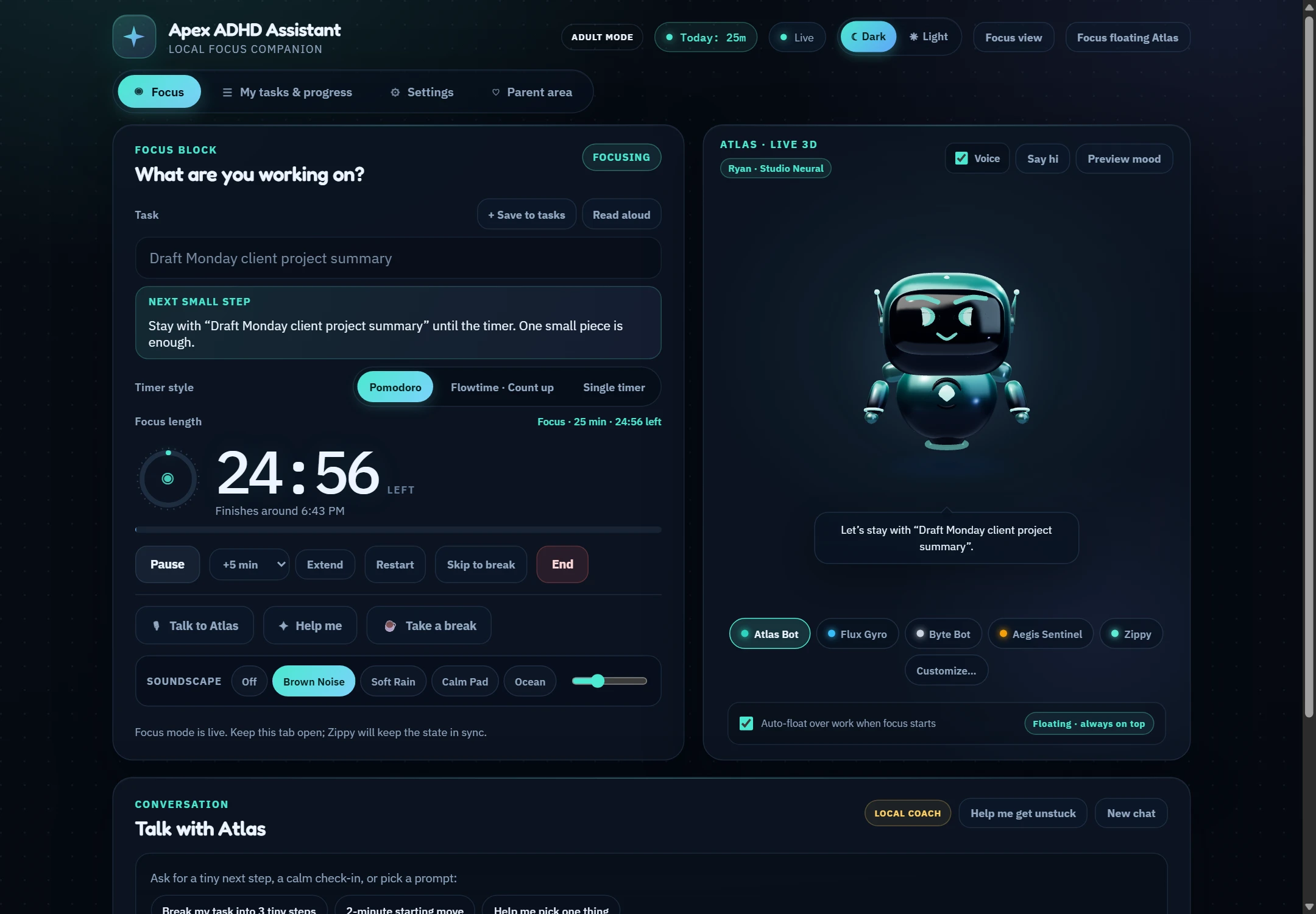
    02 · Main Focus Workspace & Live 3D Atlas Bot (Obsidian Dark)
    Apex ADHD Assistant Focus Workspace in Dark mode showing Atlas Bot in live 3D, a 25-minute Pomodoro focus timer on Draft Monday client project summary, Brown Noise active, and Today: 25m progress.
    SCREEN 02 OF 08 · MAIN FOCUS WORKSPACE

    One calm home screen for your task, timer, ambient sound, and 3D desk bot

    Instead of overwhelming project boards or red “overdue” badges, Apex keeps your eyes on just the single task in front of you—paired with a live 3D body-double companion that breathes, blinks, speaks gently, and celebrates small wins.

    • “Next Small Step” Memory Anchor + Read Aloud: Keeps one tiny action visible directly under your task (and speaks it aloud on click) so interruptions never wipe your train of thought.
    • 4 Built-In Ambient Soundscapes: Toggle Brown Noise, Soft Rain, Calm Pad, or Ocean with a live volume slider—generated smoothly on your PC with zero ads or jarring MP3 loops.
    • Always-On-Top Floating Window & Calm Focus View: Float your 3D bot over Word, Chrome, or Excel, or click Focus view in the top bar to hide every extra menu.
    03 · “Talk with Zippy” Unstuck Coach & 3-Step Task Breakdown
    Talk with Zippy coaching panel breaking Organize quarterly tax receipts and invoices into 3 concrete two-minute steps using the Built-in Local Coach.
    SCREEN 03 OF 08 · TASK INITIATION & COACHING

    Stuck on a dreaded chore? Break it into 3 tiny steps in one click

    ADHD “task paralysis” happens when a job feels too vague or huge—like “do taxes” or “clean inbox.” Press Help me get unstuck (or type/speak to your companion) and Apex turns it into three concrete two-minute physical starters.

    • 1-Tap Guided Offline Prompt Bar: Even with zero internet and zero AI setup, tap Break into 3 tiny steps, 2-minute starter, Pick one thing, or Start timer anytime.
    • Typed, PC Mic, or Wireless Phone/iPad Mic Coaching: Type naturally, press Speak on your PC, or scan a QR code on a mic-less desktop PC to talk hands-free from your phone or iPad—your companion answers in text and voice.
    • Never Confuses Venting With Timer Commands: Saying “I can’t start” or “Break my tax folder into 3 steps” triggers supportive coaching, never accidental timer stops or breaks.
    04 · Full 3D Companion Studio — 6 Adult Bots & 9 Playful Pets
    3D Companion Studio inside Settings showing live 3D Byte Bot on the left and all 15 Adult and Kids companion preset tiles on the right.
    SCREEN 04 OF 08 · 3D COMPANION STUDIO

    Design a focus companion you actually enjoy keeping on your desk

    Adults don’t want babyish cartoons during client calls, and kids love warm expressive characters during homework. Apex includes a full real-time 3D Companion Studio with separate saved designs for Adult Mode and Child Mode.

    • 6 Executive Adult Bots & Sculptures: Atlas Bot, Flux Gyro, Byte Bot, Aegis Sentinel, Kitsune Bot, and Original Zippy—rendered in anodized metal, stealth composite, and satin ceramic.
    • 9 Playful 3D Pets & Friends: Honey Pup, Star Cat, Forest Fox, Sunny Bunny, Cozy Bear, Starlight Owl, Cloud Sprite, Puff Monster, and Rainbow Friend.
    • Custom Names, Finishes & Accessories: Mix 18 studio palettes, 8 materials, custom eyes/brows, 8 accessories (headphones, glasses, scarf, crown, ribbon bow, wizard hat), and give your companion its own custom name everywhere in the app.
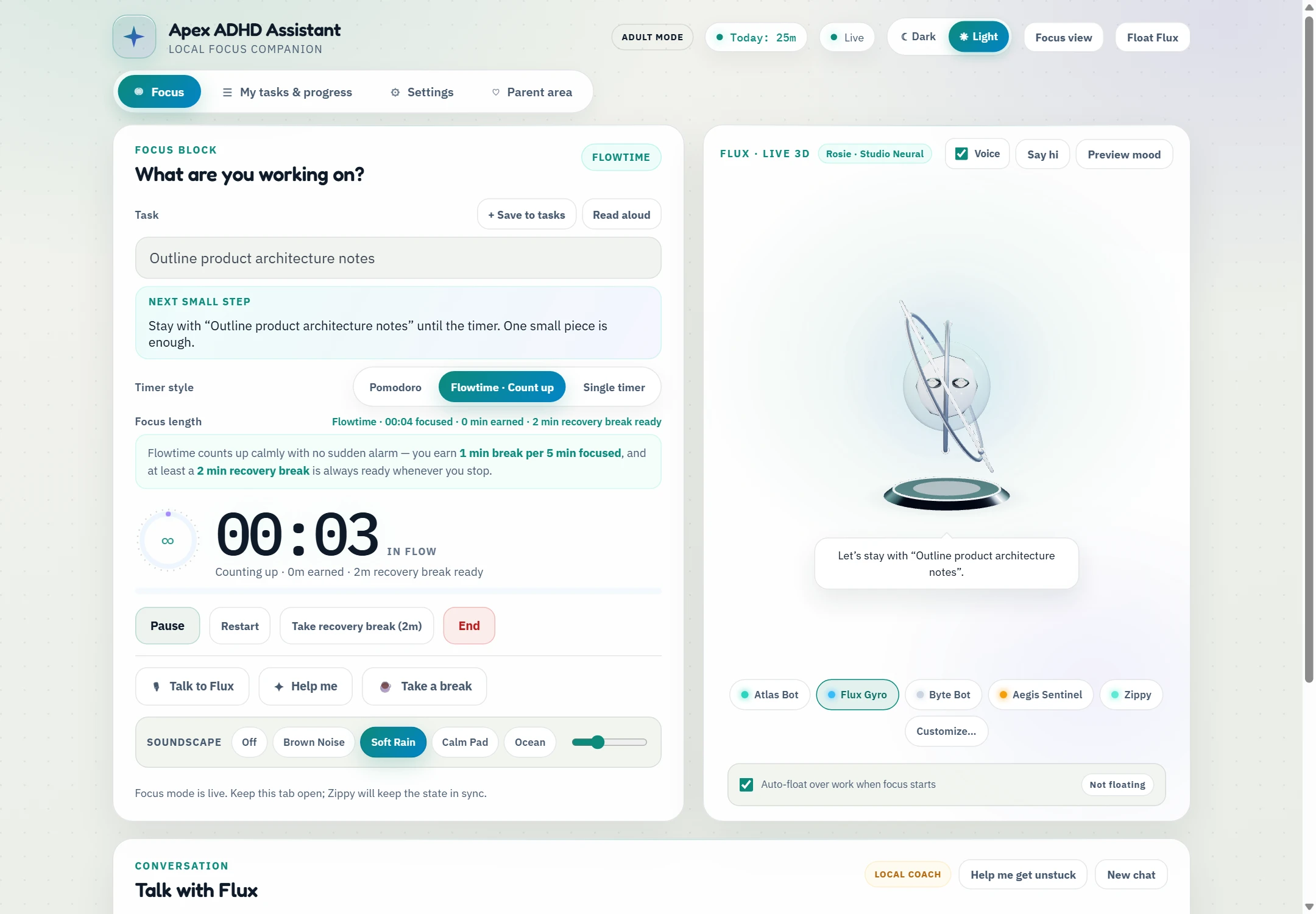
    05 · Alarm-Free Flowtime Count-Up & Ceramic Daylight Theme
    Apex ADHD Assistant in Ceramic Daylight light mode running Flowtime count-up with 3D Flux Gyro, Soft Rain active, and transparent earned break button.
    SCREEN 05 OF 08 · 3 FLEXIBLE TIMER MODES + LIGHT THEME

    Three timer styles—including alarm-free Flowtime that never shatters your groove

    Rigid 25-minute buzzers often interrupt ADHD brains at the exact moment focus finally clicks. Switch anytime between classic Pomodoro cycles, a clean Single Timer, or gentle Flowtime count-up—and toggle between Dark and Ceramic Daylight themes in one click.

    • Transparent Earned Break Math: Flowtime banks 1 minute of break for every 5 minutes you focus, while always keeping a restorative 2-minute recovery break ready immediately whenever you decide to pause.
    • Clean Break Endings & Flexible Controls: Pause, resume, add +5/+10/+15/+30 min, restart, or end any focus or break phase cleanly with accurate status across the main screen and floating window.
    • Full Visual Accessibility: Pair Dark or Light mode with High Contrast, 100%–140% App Text Scaling, and Reduced Motion in Settings.
    06 · Saved Task Queue, “Pick Up Where You Left Off” & Honest Totals
    My tasks and progress tab showing Today: 40m, Pick up where you left off continuity card, Saved tasks queue with Focus and 3 steps buttons, and completed session log.
    SCREEN 06 OF 08 · TASKS, CONTINUITY & HONEST PROGRESS

    Park upcoming tasks safely—and see real daily progress with zero streak guilt

    When a new errand pops into your head mid-session, save it to My tasks & progress so you don’t lose focus. When you come back tomorrow, Apex remembers your thread and shows every minute you genuinely focused.

    • 1-Click “Focus” or “3 Steps” From Any Saved Task: Load any queued task straight into your timer or break it into micro-steps without retyping.
    • “Pick Up Where You Left Off” Card: Gently reminds you of your last task so returning after lunch or a meeting takes two seconds.
    • Single-Truth Daily Totals (Today: 40m): Counts real focus time accurately across pauses, midnight boundaries, and restarts—never counting breaks as work or shaming missed days.
    07 · PIN-Protected Child Mode with 3D Sunny Bunny & Kid-Sized Steps
    Child Mode Focus screen showing 3D Sunny Bunny with pink ribbon bow, 15-minute homework timer on Finish 5 fractions practice problems, and CHILD MODE Today: 15m.
    SCREEN 07 OF 08 · BUILT-IN FAMILY & HOMEWORK MODE

    A separate, encouraging space for kids—without touching your work tasks

    One household PC can support both a parent’s workdays and a child’s after-school homework. Switching into Child Mode swaps to an isolated profile designed for younger attention spans and parent peace of mind.

    • Complete Adult / Child Separation: Separate current draft task, saved task list, session history, Today badge, chat log, 15-minute default timer, and 3D pet companion.
    • Offline-by-Default Child Safety: Online AI help stays strictly turned off in Child Mode unless a parent explicitly unlocks and enables it in the Parent Area.
    • Optional Parent PIN Lock: Protect profile switching, AI provider settings, spending limits, and history clearing behind a parent PIN stored locally on your PC.
    08 · Verified Free Local AI (Ollama / LM Studio), DPAPI Vault & Daily Caps
    Settings AI Connection card showing READY TO ANSWER badge for local Ollama llama3.2, capability readiness pills, Windows DPAPI key storage explanation, and AI Safety daily budget limits.
    SCREEN 08 OF 08 · PRIVATE VOICE, OPTIONAL LOCAL AI & SAFETY CAPS

    Included offline coach & voices—plus optional Ollama or Cloud AI

    You never need an external AI API key or technical knowledge to use Apex. Everything needed for coaching and Studio Neural speech is included in your subscription, and if you ever want open-ended LLM brainstorming, Apex guides you in plain English without surprise API bills.

    • 3-Stage Local AI Auto-Detection: Click Auto-Detect Free Local AI to check Ollama or LM Studio on your PC—verifying Server found → Model available → Ready to answer before switching, while preserving your working setup if a test fails.
    • 10 Offline 24 kHz Studio Neural Voices: Download the optional local neural voice pack once inside Settings for warm, natural voices (Bella, Kristin, Ryan, Rosie, Leo, Luna, Bruno, Jasper, Hugo, Kiki) with zero cloud fees.
    • Windows DPAPI Encryption & Hard Spending Caps: Optional OpenAI, Gemini, or Claude keys are encrypted to your Windows login via DPAPI and guarded by daily token and request ceilings.

    Interactive 3D Cast · Identical to the Windows Program

    Test-drive all 15 built-in 3D bots & pets right here

    Click any of the 15 presets below to load its live 3D model, material finish, and paired Studio Neural voice. Drag the 3D character on the left to orbit, or click Wave & Celebrate to preview its animations.

    LIVE 3D STUDIO MODEL · DRAG TO ORBIT

    Atlas Bot

    Adult Studio · Anodized Obsidian & Cyan · Studio Voice: Ryan (Grounded Coach)

    “Steady executive focus droid. Keeps your next two-minute step anchored without chatter.”

    Full mix-and-match customization included inside the app: 18 studio color palettes, 8 surface finishes (anodized metal, matte stealth carbon, satin ceramic, plush fur, velvet, luminous glass), custom eyes & brows, and 8 optional accessories (focus headphones, studio glasses, cozy scarf, star emblem, golden crown, ribbon bow, starry wizard hat).

    Complete Feature Overview · Current Release

    Everything packed inside Apex—organized simply for everyday use

    Every feature stays calm and out of your way until you want it—giving beginners a simple 1-click focus timer while offering rich customization in Settings.

    OFFLINE STUDIO NEURAL AUDIO + LOCAL MIC 24 kHz ONNX · 0 API KEYS

    Goodbye robotic voices. Hello 10 warm, human studio voices & local push-to-talk.

    Apex speaks immediately with your best Windows voices, and lets you download a 10-voice Offline Studio Neural pack (~170 MB) in one click—synthesized locally on your PC’s CPU alongside offline speech-to-text transcription and a live microphone level tester.

    Bella · Warm & Calm Kristin · Clear Conversational Ryan · Grounded Coach Rosie · Soft & Gentle Leo · Unhurried Storyteller Luna · Friendly & Bright + Bruno, Jasper, Hugo & Kiki
    3 TIMER MODES + 4 SOUNDSCAPES

    Pomodoro structure, alarm-free Flowtime, or a Single clean countdown.

    Choose Pomodoro cycles, Single Timer (5m–180m with no auto-break buzzers), or Flowtime count-up (1m break earned per 5m focused, with a 2m recovery break always ready). Pair any session with 4 live procedural Web Audio soundscapes:

    • Velvet Brown Noise & Soft Window Rain Deep low-pass thought-quieting & warm gentle rainfall
    • Warm Calm Pad & Slow Ocean Breath Subtle harmonic drone & 6-breath/min wave cadence—no MP3 loops
    UNIVERSAL QR PHONE & IPAD BRIDGE

    Floating PC mini-window + wireless Phone/iPad camera, mic & speaker

    Desktop PC with no webcam or microphone? Scan an end-to-end encrypted HTTPS QR code to use any iPhone, Android, or iPad as your desk-presence camera, push-to-talk mic, speaker, and live 3D desk timer—even across wired Ethernet, guest Wi-Fi, or 5G.

    SENSORY & VISUAL COMFORT

    Calm Focus View, Dark/Light, High Contrast & 140% text

    Hide navigation clutter in one click with Calm Focus View, switch between Obsidian Dark and Ceramic Daylight, turn on High Contrast, scale text from 100% to 140%, or enable Reduced Motion.

    LOCAL BACKUP & OWNERSHIP

    1-click JSON data export & local ownership

    All tasks, custom companions, preferences, and session logs live locally in your Windows user folder—and remain safely exportable anytime, even if you pause or cancel your subscription.

    Hardware-grade honesty

    Your focus data never leaves your PC unless you say so

    An ADHD assistant shouldn’t harvest your habits. Apex has no user accounts, no telemetry cloud, and no hidden analytics. Every optional awareness helper starts physically OFF.

    • Local JSON & Windows DPAPI vault. Tasks, timers, and session history stay in your own Windows user folder—export a backup or clear history anytime.
    • Granular opt-in switches + Private App Shield. Camera desk-return detection, optional screen drift nudges (with private window blocklists), and paired phone sensors are independent toggles that pause automatically on breaks.
    • Physical-style Stop All switch. One click cuts every active camera, screen, and mic stream across your PC and paired phone immediately.
    PRIVACY SWITCHBOARD // DEMO
    Offline Coach & Studio Neural Voices Included in subscription · $0 extra AI API bills LOCAL ON

    Status: All cameras, screens & mics physically OFF · Tasks & history stay local on your PC

    Made for everyday Windows users · Zero unzipping or technical setup

    From one-click Setup.exe to your first focus block in under 60 seconds

    Never unzip folders, run scripts, or configure servers. Double-click the standard Windows installer, enter your Apex subscription key, and optionally scan a QR code with your phone or iPad.

    1. 01 · INSTALL

      Double-click Apex-ADHD-Assistant-Setup.exe

      Installs cleanly into Windows in seconds—creating your Desktop and Start Menu shortcuts, system-tray helper, and standard Windows Installed Apps uninstaller automatically.

    2. 02 · ACTIVATE & PAIR

      Enter your subscription key (+ optional Phone/iPad QR)

      Paste your Apex license key once to unlock your PC. No webcam or mic on your desktop tower? Click Pair Phone / iPad and scan the QR code with your phone camera.

    3. 03 · FOCUS

      Work with a calm body-double—and rest without guilt

      Your 3D companion floats quietly beside your work, shrinks stuck chores into two-minute moves, speaks gently when helpful, and keeps your tasks privately on your PC.

    Windows 10 & 11 Installer · Subscription Access

    Get the 1-Click Windows Installer & Subscription Access

    Apex runs locally on Windows 10 & 11 for full floating-companion power, local Child Mode privacy, and $0 extra AI/voice API bills—paired with an active Apex subscription key and universal HTTPS QR Phone/iPad support. Request your download and subscription key details below.

    ✓ 1-Click Setup.exe (no .zip) ✓ Phone & iPad QR Cam/Mic included ✓ Local tasks always exportable

    Handled cleanly via Netlify Forms · Zero tracking cookies.

    Apex ADHD Assistant Screenshot
    Enlarged Apex ADHD Assistant screenshot